What Are Construction Robots?
Construction robots are flying automated builders. They take items from storage chests in the logistics network and place them according to blueprints or ghost entities. They also repair damaged buildings using repair packs stored in the network.
| Stat | Value | Notes |
|---|---|---|
| Speed | 0.06 tiles/tick | ~3.6 tiles/sec base speed |
| Cargo capacity | 1 item per trip | They carry one item, return, get the next |
| Power | 1 kW flying, 4 MW charging | Charging drains a lot -- roboport placement matters |
| Robot recharge | 1 sec in roboport | 60% drain to 100% charge |
| Range | Roboport range (50x50 tiles) | Network expands by overlapping roboports |
Construction robots do NOT move items between chests. That is the job of logistic robots. But both types share the same roboport network and charging infrastructure.
Prerequisites
Before your first robot can fly, research these technologies from the Robotics branch:
| Technology | Cost (red+green science) | Unlocks |
|---|---|---|
| Robotics | 75 blue science | Basic roboport + construction robots |
| Logistic System | 100 blue + 100 black science | Logistic robot + logistic chests |
| Construction Robotics | 100 blue science | Construction robots (automated building) |
| Worker Robot Cargo Size | 150+ science | Robots carry 2+ items per trip |
If you are still on early science packs, finish blue science first. The robotics tree requires blue science to start.
Step-by-Step Setup
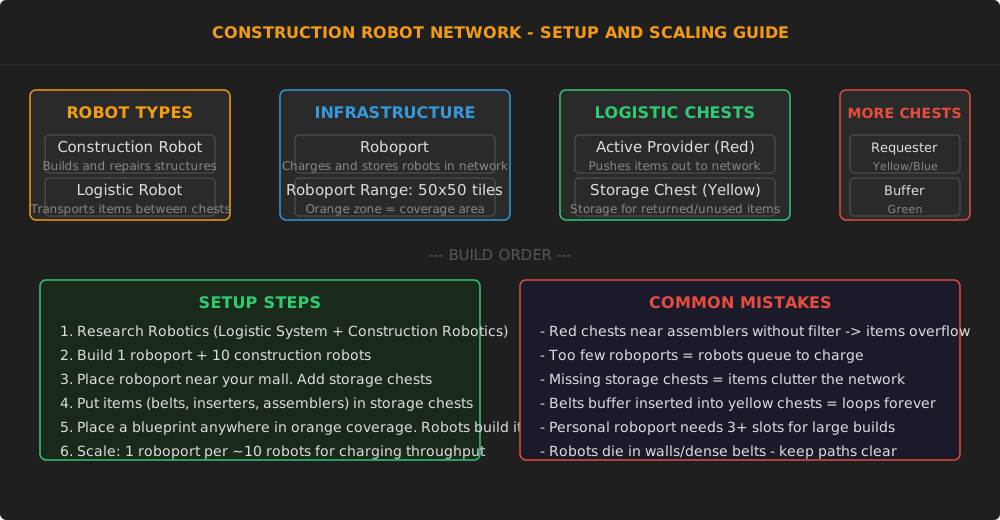
Step 1: Build a roboport Place one roboport near your production mall (the area where you make belts, inserters, assemblers, and other base-building items). The roboport creates a 50x50 tile orange zone where robots can operate.
Step 2: Add storage chests Place storage chests (yellow color) inside the orange zone. Fill them with common building materials:
- Transport belts, splitters, underground belts
- Inserters (fast, long, stack)
- Assembling machines 1-3
- Power poles and substations
- Pipes and underground pipes
- Train tracks and signals (if you have rail infrastructure)
Step 3: Insert construction robots Put 10-20 construction robots into the roboport. They sit there idle until a ghost entity or blueprint is placed within the orange zone.
Step 4: Test it Place a blueprint (or ghost-place a building using Shift+mouse click) within the orange zone. Watch the construction robot fly out, grab items from storage, and build it. For this reason, a main bus design where the mall is near the bus output works perfectly.
Scaling the Network
| Stage | Roboports | Robots | Coverage | What You Can Do |
|---|---|---|---|---|
| Starter | 1 | 10-20 | 50x50 tiles | Blueprint ghost building near mall |
| Workshop | 3 | 50-100 | 100x100 tiles | Automate repairs, small expansions |
| Outpost builder | 10 | 200-500 | Full base | Blueprint entire factory sections |
| City block | 50+ | 1000-2000 | Multiple blocks | Train-to-rail construction network |
| Megabase | 200+ | 5000-10000 | Full coverage | Instant blueprint paste everywhere |
Key scaling law: One roboport handles roughly 10 robots charging simultaneously. If you see robots circling in mid-air (waiting for a charging slot), you need more roboports. Place them every 50 tiles in a grid pattern for full coverage.
Logistic Chest Types
| Chest | Color | Behavior | Use Case |
|---|---|---|---|
| Active Provider | Red | Pushes items into network immediately | Machine outputs, garbage disposal |
| Passive Provider | Purple/Red | Items available for pickup | Standard storage, belts feeding chests |
| Storage Chest | Yellow | Robots return unused items here | Blueprint deconstruction output |
| Requester Chest | Blue/Orange | Requests items from network | Feed specific machines from network |
| Buffer Chest | Green | Stores items near demand area | Mid-point caching for large bases |
Getting your first chests: Research Logistic System (blue + black science) to unlock logistic chests. The first requester chest is a game-changer -- it lets you feed an assembler with items from anywhere in the network.
Construction vs Logistic Robots
| Aspect | Construction Robot | Logistic Robot |
|---|---|---|
| Primary use | Building and repairing | Moving items between chests |
| Carries | 1 building per trip (more with upgrades) | Up to 4 items (more with upgrades) |
| Needs blueprint | Yes -- builds from ghost/blueprint | No -- follows logistic requests |
| Charging | Roboport | Roboport |
| Without requests | Idles in roboport | Idles in roboport |
| Repair packs | Uses them automatically | Does not use repair packs |
Most players start with construction robots for blueprint building, then add logistic robots when they need automated item transport. Logistic robots shine for low-volume, high-variety item transport (like feeding a circuit network test setup) but are less efficient than belts for high-volume transport.
Common Mistakes
- Red chests without filters: An active provider chest near an assembler pushes items into the network constantly. If the assembler fills the chest, robots carry those items to storage chests, then back to the assembler -- an infinite loop. Use passive provider chests (purple) for normal storage.
- No storage chests: When you deconstruct a building, robots pick up the items and try to store them. Without a storage chest, items stay in the robot's cargo indefinitely, reducing your effective robot count.
- Robots dying in belts: Construction robots fly straight to their destination. If a belt line crosses their path, a robot can collide with the belt and be destroyed in incompressible belt items. Keep clear lanes between roboports and common build sites.
- Not enough charging: If you paste a large blueprint (500+ buildings), robots queue up at roboports to charge. This can take 10+ minutes. Multiple roboports spread the charging load.
Bottom Line
Construction robots automate the most tedious part of Factorio: hand-placing items from blueprints. One roboport and ten robots is enough to test the system. Scale to 100 robots once you trust the network. Blueprint entire factory sections without ever placing a single belt by hand -- that is the power of a well-set-up construction robot network.
Community Verification
- Factorio Wiki: Construction robot -- Robot stats, speed, and behavior
- Factorio Wiki: Roboport -- Charging mechanics and network ranges
- Factorio Wiki: Logistic chests -- All chest types and their behavior