You placed your first train stop, sent a locomotive to pick up iron ore, and now two trains are facing each other on the same track with nowhere to go. The chain signal is red. The rail signal is also red. Every intersection in your rail network is locked up. Here's the one-rule fix that prevents deadlocks entirely.
The Mechanics Behind Train Deadlocks
Factorio's rail system uses blocks. A block is a section of track bounded by signals. A train will not enter an occupied block. If blocks are too large or signals are placed wrong, trains stop inside intersections — blocking all other traffic.
The two signals and when to use them:
| Signal | What it does | Where to place it |
|---|---|---|
| Rail signal | Shows green if block ahead is clear | After intersections, on straight track |
| Chain signal | Shows green only if the NEXT block after it is also clear | Before intersections, before rail crossings |
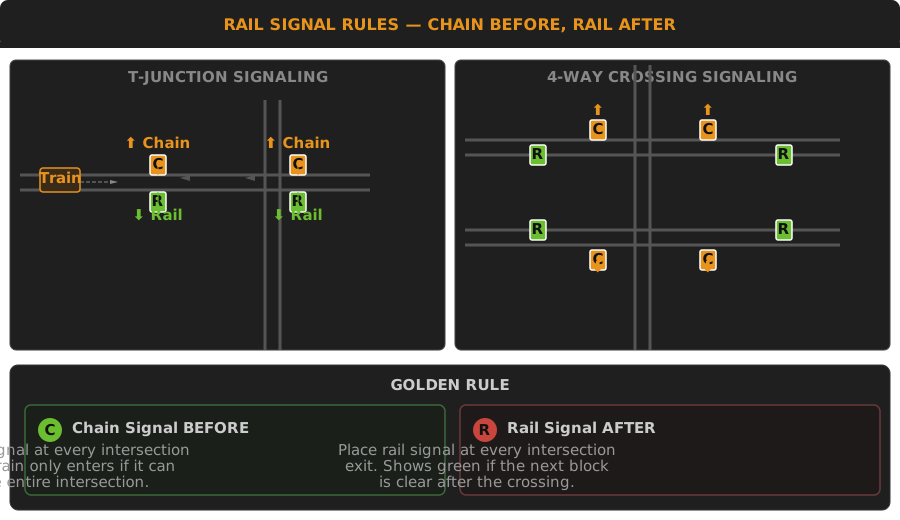
The rule: Chain before intersection, rail after intersection. If there's a string of intersections close together, chain signal before the first one and rail after the last one, with chain signals between them.
The Proven Fix — 2-Lane Rail Grid
Step 1 — Right-hand drive layout.
Run two rails: trains travel on the right. That means:
- Outer rail on each side → direction of travel
- Space between rails: 4 tiles (enough for signals between tracks)
Step 2 — Intersection signals.
For a simple T-junction:
- Before each entrance: chain signal on the right rail
- After each exit: rail signal on the right rail
- Inside the junction: no signals (trains should pass through without stopping)
For a 4-way intersection (crossing):
- Chain signals at all four entrances
- Rail signals at all four exits
- If the intersection is compact, chain signals inside any branching path
Step 3 — Train stops.
Each station needs:
- A rail signal immediately after the station (defines the station block)
- A chain signal before the first turn into the station (prevents trains blocking the main line while waiting)
- Station name:
[Resource] Location Function(e.g.[Iron] Smelter Input)
Where Most Players Mess This Up
Rail signal inside the intersection. A train stops on the rail signal, which is inside the intersection, blocking all crossing paths. Fix: chain signals at entrances ensure trains don't enter unless they can clear the entire intersection.
Roundabout without chain signals. A single-track roundabout with rail signals at each exit. A train enters, then stops because the exit is blocked — jams the entire roundabout. Fix: chain signal at every roundabout entrance.
One-way tracks in a two-way network. Every piece of track should be assigned one direction. If you place a locomotive facing the wrong way, the station may not work, or the train may try to reverse. Solution: use one-way rails exclusively for large networks.
Too few stackers. A station with limit 3 and 3 trains: when all 3 are at the station, the third waits on the main line, blocking everything. Build a stacker (waiting area with multiple parallel tracks) outside each high-traffic station.
Pushing It Further — Megabase Rail Networks
At 500+ SPM, your rail grid needs:
4-lane tracks — 2 lanes per direction. Dedicated passing lane for faster trains.
Buffered intersections — Intersections with waiting bays for turning traffic. Prevents a turning train from blocking the straight-through lane.
Train fuel depots — 1-minute refuel stop in the center of the grid. Every train's schedule starts with: Depot (fuel stop, 5s) → Pickup → Drop-off → Back to Depot.
Centralized train control — Use circuit network to broadcast open station slots. A "train manager" combinator at each station sends availability to a central signal.
For a complete rail-based base layout, see City Block Design Guide.
Key metrics to track:
- If trains wait more than 30 seconds at any intersection: upgrade that junction
- If stacker fills up regularly: add more stacker capacity
- If fuel trains cannot reach depots: the grid is too congested
Community Verification & Resources
- Official Wiki — Rail Signals — signal placement rules, chain signal behavior, and block mechanics
- Official Wiki — Train Automation — interactive tutorial on chain and rail signal logic
- Factorio Forums — Rail Design — community blueprints for 4-lane intersections and train stackers
- Factorio Blueprint Library — Train Grids — ready-to-use 2-lane and 4-lane City Block rail grids