 Thruster
thruster fuel and
Thruster
thruster fuel and  Thruster
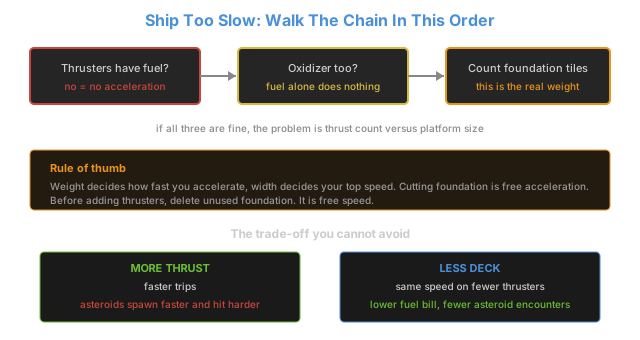
thruster oxidizer are actually reaching the thrusters, because a platform missing oxidizer does not run slow, it does not move at all.
Thruster
thruster oxidizer are actually reaching the thrusters, because a platform missing oxidizer does not run slow, it does not move at all.If your ship takes ten minutes to reach Gleba while someone else's does it in two, the difference is almost never the number of  Thruster
thrusters. It is the shape of the hull, and specifically how much of it you paved.
Thruster
thrusters. It is the shape of the hull, and specifically how much of it you paved.
The Two Limits Everyone Confuses Into One
"Slow platform" is two problems wearing one hat, and they have completely separate fixes:
| Limit | What sets it | Symptom | Fix |
|---|---|---|---|
| Top speed | Hull width (drag) | Accelerates fine, then stops climbing early | Narrow the hull |
| Acceleration | Total mass (foundation tiles) | Sluggish off the line, forever reaching speed | Delete foundation |
Drag rises with width, so a wide hull hits its ceiling early no matter how many thrusters you bolt onto it. Mass does the opposite job: it decides how long the climb to that ceiling takes. Players have worked the acceleration step out as roughly acceleration = thrust / weight / 60 per second, which is why mass matters so much - it sits in the denominator.
What Your Platform Actually Weighs
This is where most builds go wrong, because the mass table is far shorter than players assume:
| Part | Mass |
|---|---|
| Space platform hub | 20 t |
| Space platform foundation, per tile | 0.2 t (200 kg) |
| Cargo bays, turrets, machines, thrusters | 0 t - none of these add mass |
Only two things have mass: the hub and the tiles. Everything else is free, including cargo bays, which is the single most common thing players blame for no reason.
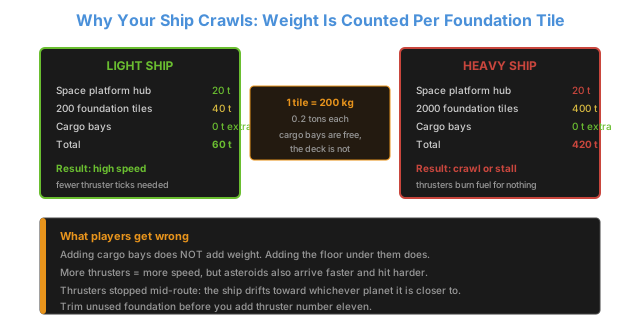
A 200-tile deck comes to 60 t total. A 2000-tile deck comes to 420 t. Same thrusters, seven times the mass, and the acceleration formula divides straight through that number.
Check Fuel And Oxidizer Before You Rebuild Anything
Thrusters take two inputs, not one. A platform running on
Thruster
thruster fuel with no
Thruster
oxidizer produces no thrust whatsoever, and one running with oxidizer but no fuel does the same. If your ship is genuinely crawling rather than parked, both are already flowing and you can skip straight to the hull.
The usual cause of an oxidizer gap is not production, it is plumbing: the oxidizer recipe sits downstream of  Crude oil
crude oil processing on the platform, so a stalled water or ice line quietly starves the thrusters while the fuel tank still looks full.
Crude oil
crude oil processing on the platform, so a stalled water or ice line quietly starves the thrusters while the fuel tank still looks full.
The Fix Order That Saves The Most Rebuilding
- Delete unused foundation first. Every tile you paved "for later" is 0.2 t you accelerate on every single trip, forever. Removing 500 tiles costs you nothing and takes 5 kg-s of inertia off the ship.
- Narrow the hull if top speed is capped. This is the only change that raises the ceiling itself. A long thin ship outruns a short fat one with identical thrusters.
- Only then add thrusters. Thrusters are the expensive fix, and they carry a cost people forget: a faster platform makes asteroids spawn faster and hit harder. Bolting more thrust onto a heavy wide hull buys you speed and hands you a harder combat problem on the same route.
- Upgrade thruster quality last. Higher quality thrusters produce more thrust per unit, which is the one way to buy speed without touching the hull shape at all. The full mechanic is covered in https://factorioguides.com/space-age/quality/quality-module-guide/, and it matters most on long routes where you cannot afford to widen the ship.
The Trade-Off You Cannot Design Around
| You want | What it costs you |
|---|---|
| More thrusters | Faster trips, but asteroids spawn faster and hit harder |
| Wider hull | More collection per trip (collection scales with width), lower top speed |
| Narrower hull | Higher top speed, less collection area |
| More cargo bays | Nothing - they carry no mass penalty |
| More foundation | Nothing but inertia - it is pure acceleration tax |
That second row is the real tension. Collection rate scales with width, so the ship that gathers  Asteroid
asteroid chunks fastest is by definition the ship that runs slowest. Most players end up with two hulls: a wide slow freighter for bulk runs, and a narrow fast shuttle for anything time-critical. If you are deciding what actually has to move between planets, https://factorioguides.com/space-age/platform/cross-planet-logistics/ breaks down which cargo justifies a fast hull and which sits happily on the slow one.
Asteroid
asteroid chunks fastest is by definition the ship that runs slowest. Most players end up with two hulls: a wide slow freighter for bulk runs, and a narrow fast shuttle for anything time-critical. If you are deciding what actually has to move between planets, https://factorioguides.com/space-age/platform/cross-planet-logistics/ breaks down which cargo justifies a fast hull and which sits happily on the slow one.
The 60-Second Diagnosis
| Symptom | Real cause | First fix |
|---|---|---|
| Does not move at all | Missing oxidizer or fuel | Check both inputs at the thruster |
| Accelerates then stops early | Hull too wide for the thrust | Narrow the hull |
| Sluggish off the line, fine at the end | Too much foundation | Delete unused tiles |
| Fast but constantly losing turrets | Too many thrusters for the route | Cut thrust or add defense |
| Slow only when fully loaded | Loading does not matter, check width | Narrow the hull |
| Got slower after an expansion | New tiles, not new cargo | Delete the expansion you are not using |
What NOT To Do
| Bad idea | Why it fails |
|---|---|
| Adding thrusters without checking width | Drag still caps you at the same speed |
| Paving the full rectangle for future expansion | Every tile is permanent acceleration tax |
| Blaming cargo bays | Cargo bays weigh nothing |
| Copying a wide freighter blueprint for a fast route | You inherited someone else's collection priorities |
| Rebuilding from scratch | Deleting tiles is usually enough |
If you are designing the hull from zero rather than fixing one, https://factorioguides.com/space-age/platform/space-platform-guide/ covers the base layout, and https://factorioguides.com/space-age/platform/ship-design/ has route-specific hulls that already balance collection against speed.
Community Verification and Resources
- Factorio Wiki: Space platform - official mass values and the speed behaviour during each half of a trip
- Factorio Wiki: Thruster - thrust, drag and the fuel plus oxidizer requirement
- Reddit r/factorio - player testing on width versus mass and maximum achievable speeds
Last updated: 2026-09-26 | Verified against Factorio 2.0 / Space Age.