I used belts exclusively for 200 hours. Belts for iron, belts for circuits, belts for everything. Then a friend blueprint-stamped a full factory section in 30 seconds using construction robots. I watched my carefully placed assembling machines appear as ghosts and materialize in perfect rows. The next day I converted my entire mall to logistic robots. Here's everything I learned about robot networks.
The Two Robot Types
| Robot type | Role | Speed (base) | Cargo size | Charging |
|---|---|---|---|---|
| Construction robot | Build, repair, upgrade | 36 km/h | 1 item | 4 sec at roboport |
| Logistic robot | Transport items | 36 km/h | 4 items | 4 sec at roboport |
Construction robots are for blueprints and repairs. Logistic robots are for item transport between chests. They share the same infrastructure (roboports, robot frames) but do completely different jobs.
When to use each:
| Task | Build | Repair | Upgrade | Item transport | Trash unneeded items |
|---|---|---|---|---|---|
| Construction bots | Yes | Yes | Yes | No | No |
| Logistic bots | No | No | No | Yes | Yes |
Roboport Placement
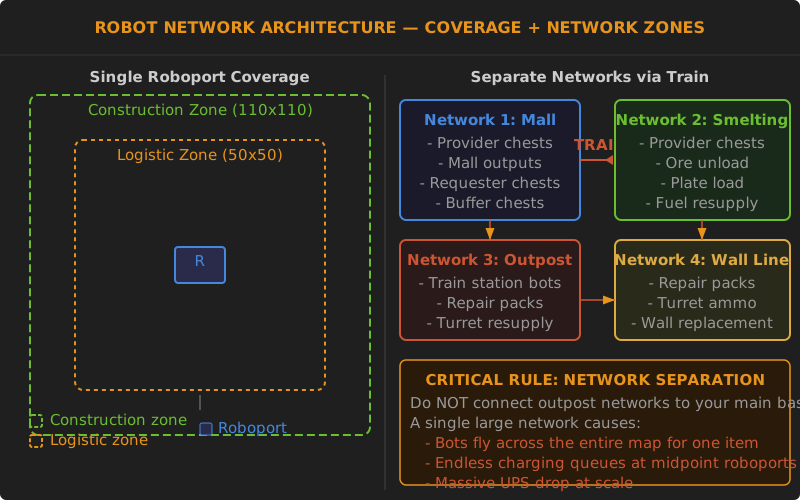
Each roboport covers a 50x50 tile orange zone (logistic network area) and a 110x110 tile green zone (construction area). To maximize coverage:
Grid placement: Place roboports in a square grid pattern with exactly 50 tiles between centers. This gives overlapping coverage with no gaps.
Large bases: For a base larger than 100x100 tiles, build multiple separate roboport networks. Each network communicates internally. To move items between networks, use train stations - not belts running through coverage zones.
Network 1 (mall) <- train -> Network 2 (smelting) <- train -> Network 3 (science)
This prevents bots from flying across your entire base to pick up one item.
Logistic Chest Types Explained
| Chest type | Icon | Behavior | Use case |
|---|---|---|---|
| Active provider | Red circle | Actively pushes items out. Bots grab anything stored here and distribute to requesters/storage. | Mall outputs, production overflow |
| Passive provider | Green arrow | Passively makes items available. Bots grab items only when requested. | Mall outputs (standard choice) |
| Storage chest | Yellow circle | Stores excess items. Bots put items here when network overflows. | Trash slots, deconstruction returns |
| Requester chest | Blue arrow | Requests items from the network. Bots deliver specified items here. | Assembler inputs (bot mall) |
| Buffer chest | Red symbol | Acts as a local storage depot. Bots restock this chest from providers. | Ammo resupply, wall repair packs |
Common setup for a bot mall:
Assembler -> Passive provider chest -> Logistic bots deliver -> Requester chest -> Assembler
The mall assembler outputs to a passive provider. Logistic bots pick up the items and take them to requester chests on consuming assemblers.
Construction Robots - Practical Usage
Blueprint stamping:
- Create a blueprint (Ctrl+C, select area, save)
- Open the blueprint and place it as a ghost
- Construction robots materialize the items from passive provider chests
- Items must be within the same roboport network
Repair and upgrade:
- Store repair packs and replacement structures in a buffer chest near walls
- Robots automatically fly out to repair damaged structures in their network
- Use upgrade planner + Ctrl+Z to upgrade all yellow belts to red in one click
Ghost building: Any item you can hand-place can be blueprint-stamped. This includes belts, assemblers, furnaces, modules, walls, turrets, and power poles.
Logistic Robots - Practical Usage
Personal logistics: Set up auto-delivery in your character logistics menu:
- Request 100 yellow belts (auto-fills from network when inventory is low)
- Request 50 fast inserters
- Request 20 assembling machines 3
- Request 200 ammunition
- Trash wood and stone you pick up (trash slots -> storage chests)
Auto-trash: Set unused items in your logistics trash slots. When you pick up items from deconstruction, they go into storage chests automatically. The storage chests then feed back into the mall.
Train supply:
- Buffer chest at train loading station requests construction supplies
- Bots deliver items from mall to the buffer chest
- Train takes supplies to outpost
- Outpost has its own roboport network for building
Bot Count Estimation
| Network size | Logistic bots | Construction bots | Notes |
|---|---|---|---|
| Small mall | 50-100 | 10-20 | Basic item transport |
| Medium factory | 200-500 | 50-100 | Mid-game science |
| Bot-based base | 1,000-3,000 | 200-500 | Belts optional |
| Megabase bot-only | 5,000-10,000 | 500-1,000 | Dedicated bot charge stations |
The 50-bot minimum rule: Don't bother with a bot network until you have at least 50 bots. A 10-bot network is worse than belts because items take forever to arrive. The first 50 charging at a single roboport also takes forever.
Charging bottleneck fix: When bots hover over a roboport waiting to charge, they block others from entering. Solution: add more roboports in the high-traffic area. For a bot-based base, build dedicated "charge stations" - clusters of 4 roboports with nothing else.
Common Robot Network Pitfalls
"My bots keep dying" - Construction bots fly to the nearest available item, even through biter nests. Solution: keep repair packs in buffer chests near walls, and use turret coverage along flight paths.
"Bots keep flying across the base for one item" - Single large network problem. Split into separate networks connected by trains or belts.
"My bots are all charging at once" - When a high-load operation finishes (like stamping a 100-furnace array), all bots return to charge simultaneously. Solution: add extra roboports around high-activity areas.
"Things are stuck in storage chests" - Active provider chests push items out. If you use passive providers, items in storage chests won't be prioritized. For high-demand items, set up buffer chests.
Upgrading to a Bot-Based Base
Some players build entire bases using only bots. Here's the pattern:
- Isolated production cells: each has its own small bot network
- Trains move raw materials between cells
- Each cell is a blueprint you can stamp: smelting module, circuit module, science module
- Central requester chests coordinate the flow
- 5,000+ bots covering the entire base (multiple networks)
Bot-based bases are simpler to scale (no belt mathematics) but consume more power and have lower UPS.
Bottom Line
Robot networks are the single biggest quality-of-life improvement in Factorio. Use them first for blueprints and repairs, then for your mall, then for personal logistics, and finally for full production. Always build multiple small networks instead of one large network. 50+ bots minimum before building a network.
Numbers to remember:
- Roboport grid spacing: 50 tiles center-to-center
- 50 bots minimum for useful network
- Split networks at 100x100 tiles
- Buffer chests for high-traffic restocking
- Construction bots always need repair packs nearby
Related: How to Use Blueprints | Circuit Network Guide | Mall Guide
Community Verification & Resources
- Official Factorio Wiki -- Logistic Robot - exact speed, battery, and behavior data
- Official Factorio Wiki -- Construction Robot - blueprint and repair mechanics
- Official Factorio Wiki -- Roboport - charging and coverage details
- Reddit -- Bot Network Tips - community troubleshooting for common network issues