What Blueprints Actually Do
A blueprint copies a design. A blueprint book stores many designs. Together they turn your factory from a hand-built thing into something you can reproduce anywhere.
| Tool | Shortcut | Purpose |
|---|---|---|
| Blueprint | G | Copy a design |
| Blueprint book | In inventory | Organise many blueprints |
| Upgrade planner | In inventory | Swap buildings across an area |
| Deconstruction planner | In inventory | Mark things for removal |
Copy a Design
- Press G (blueprint tool)
- Drag a rectangle around the area you want to copy
- The blueprint appears on your cursor - click your inventory to store it
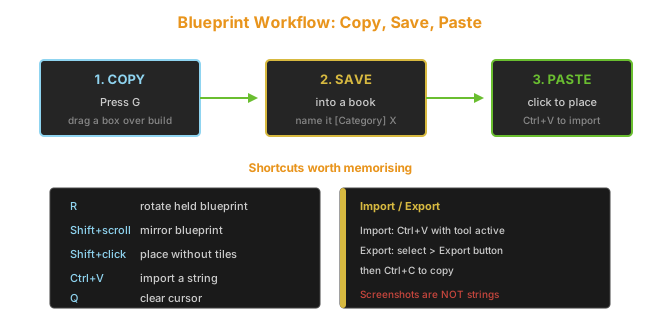
| Action | How |
|---|---|
| Copy a build | G, drag box |
| Rotate held blueprint | R |
| Mirror held blueprint | Shift + scroll |
| Place (no tiles) | Shift + click |
| Cancel | Q |
Shift + click places the blueprint without its floor tiles (concrete, stone brick). This is the fastest way to reuse a design on a different surface.
Save to a Blueprint Book
- Open your inventory
- Click the blueprint
- Click Save and choose a blueprint book
- Give it a clear name
[Category] Description, for example [Smelting] Iron 12x Furnace. Future you will thank present you.Import and Export Strings
Blueprint strings are how designs travel between players and from websites.
| Task | Steps |
|---|---|
| Import | Copy the string, press Ctrl+V with the blueprint tool active |
| Export | Select blueprint, click the export button top-right, Ctrl+C |
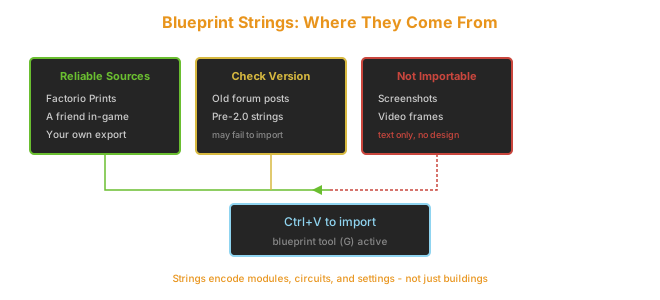
| String Source | Reliability |
|---|---|
| Factorio Prints / community sites | Good - check version |
| A friend in-game | Perfect |
| Old forum posts | Risky - may predate 2.0 |
| Random screenshots | Not a string - cannot import |
Strings encode the whole design including modules and circuit settings. An old string may reference items that no longer exist in 2.0 - if import fails, that is usually why.
Organising a Blueprint Book
A good book structure saves hours of searching later.
| Book | Contents |
|---|---|
| Production | Smelting, circuits, science packs |
| Defense | Walls, turrets, artillery outposts |
| Trains | Stations, loaders, unloaders |
| Modules | Beaconed builds, speed/prod setups |
| Circuit networks | Combinators, smart stations - see the circuit network guide |
| Mall | Inserters, belts, chests (self-building factory) |
Keep books under 20 entries each. A book with 80 blueprints is slower to use than no book at all.
Blueprint Parameters (The Feature You Are Not Using)
Parameters let a single blueprint ask you for a recipe instead of hard-coding one.
| Without Parameters | With Parameters |
|---|---|
| One blueprint per recipe | One blueprint, any recipe |
| 10 assembler builds for 10 items | 1 parameterised build |
| Editing means rebuilding | Set recipe on paste |
How to set it up:
- Place an assembler with no recipe in your build
- Create the blueprint
- When you paste it, the game prompts you to pick the recipe
- Save that as your parameterised blueprint
This is how megabase builders ship a single "generic assembler" design that works for every product.
Upgrade Planner
The upgrade planner swaps every building in an area to a better tier in one drag.
| Upgrade Path | Common Use |
|---|---|
| Stone furnace -> Steel -> Electric | Smelting expansion |
| Basic belt -> Fast -> Express | Throughput boost |
| Assembler 1 -> 2 -> 3 | Crafting speed |
| Yellow inserter -> Stack inserter | Gleba unlock |
Pro tip: apply the upgrade planner before pasting a blueprint to bring it up to your current technology level in one step.
Deconstruction Planner
Removes buildings in an area.
- Select the deconstruction planner
- Drag over the target area
- Construction robots remove the buildings
Related Guides
- https://factorioguides.com/blueprints/circuit-network-guide/ - wiring the circuits inside your blueprints
- https://factorioguides.com/production-ratios/beacon-module-guide/ - the beaconed builds worth blue printing
- https://factorioguides.com/trains-logistics/construction-robot-guide/ - robots that place your blueprints
Community Verification and Resources
- Factorio Wiki: Blueprint - official blueprint and string format docs
- Factorio Prints - community blueprint library
Last updated: 2026-09-26 | Verified against Factorio 2.0.