What Are City Blocks?
A city block is a uniform square of factory space, typically 64×64 or 100×100 tiles, surrounded by rail tracks. Each block handles exactly one production chain — iron smelting, green circuits, red science, etc. Raw materials come in by train, finished products go out by train.
This modular approach lets you scale your factory by copying blocks. Running low on green circuits? Stamp down another circuit block. Need more science? Add a science block. The rail network connects everything.
The key difference from a main bus is that city blocks use trains as the backbone, not belts. This makes them ideal for megabases (500+ SPM) where belt throughput becomes a bottleneck.
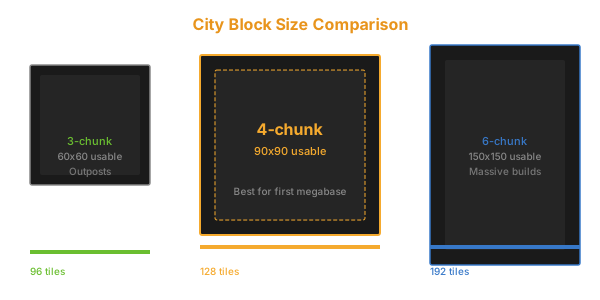
Block Sizes — Which One to Use
| Size | Best For | Train Station Fit | UPS Impact |
|---|---|---|---|
| 32×32 | Tight resource processing, outposts | 1-2 cargo wagons | Best |
| 48×48 | Compact megabases | 2-3 cargo wagons | Good |
| 64×64 | Standard megabase — recommended | 3-4 cargo wagons | Good |
| 100×100 | Large production chains, multi-smelting | 4-6 cargo wagons | Moderate |
64×64 is the gold standard. It fits a full smelting column (24 electric furnaces) plus a train station with 3 cargo wagons. It's small enough to keep UPS impact low but large enough to produce meaningful throughput per block.
Rail Grid Design
City blocks form a rail grid. Every block is surrounded by tracks, typically in a 2-lane or 4-lane configuration.
2-lane grid (simplest):
- One track per direction (left/right)
- Single roundabout at each intersection
- Supports up to ~10 trains before congestion
- Best for: early megabase, 500 SPM
4-lane grid (standard):
- Two tracks per direction
- Stacked roundabouts or bypass lanes at intersections
- Supports 20+ trains without congestion
- Best for: 1000+ SPM megabases
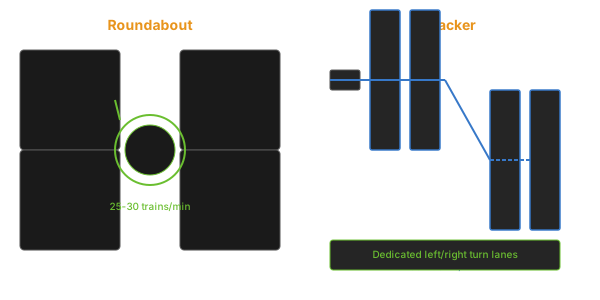
Roundabout vs T-junction:
| Intersection Type | Throughput | Space | Deadlock Risk |
|---|---|---|---|
| Roundabout | Moderate | 5×5 tiles | Medium |
| T-junction | High | 8×8 tiles | Low |
| 4-way stacked | Very high | 12×12 tiles | Very low |
Roundabouts are fine for 2-lane grids with fewer than 15 trains. Above that, upgrade to buffered T-junctions.
What Goes Inside a Block
Each block should fit one production chain. Here are typical block layouts for a 64×64 grid:
Iron Smelting Block:
- Train station: 3 cargo wagons, request iron ore
- Smelting array: 24 electric furnaces (12 per side of belt)
- Output: 1 full express belt of iron plates → train loading
- Throughput: ~2,700 plates/min
Green Circuit Block:
- Train station: request iron plates + copper plates
- 12 assembling machine 3s with speed beacons
- Output: ~1,800 green circuits/min
- Copper cable assembled in the same block (direct insertion preferred)
Science Block (example: red + green):
- Train station: request iron plates + copper plates + gears
- 10 red science + 10 green science assemblers
- Output: direct to lab array
Train Station Design per Block
Every block needs a train station that fits within the block boundaries. For a 64×64 block:
Station layout (from block edge inward):
- Rail signal (after the intersection)
- 3-tile train stop area (locomotive + 3-4 cargo wagons)
- Buffer chests (steel chests, 6 per wagon)
- Belt balancer (merges chest outputs)
- Production area
Station naming convention:
[Iron] Smelting Input— "train stop name" close to the "wagon wait area"[Iron] Smelting Output— "output name" for the pickup station[Green Circuit] Input[Green Circuit] Output
Using consistent naming makes train schedule management much easier.
Power Distribution
Run a dedicated power line along the rail grid. Each block taps power from the nearest rail-side power pole.
For a 64×64 grid:
- Place a substation every 2 blocks along the rail line
- Each block gets 2 medium electric poles for internal distribution
- Nuclear power is the recommended source for city block bases
UPS note: Large power grids cause minor UPS impact. Use substations instead of power poles where possible — fewer entities to track.
Resources Distribution — Balancing the Grid
The challenge with city blocks is resource distribution. You can't just send iron to every block that needs it — you need a system.
Approach 1: Dedicated train pairs (simplest) Each block has a dedicated train that shuttles between a supply block and a demand block. Simple to set up, but doesn't scale.
Approach 2: Provider/requester network (recommended) Use train limit signals. Each station broadcasts how many trains it can accept.
- Smelting block:
Iron Plate Output→ limit = 2 (2 train loads ready) - Circuit block:
Iron Plate Input→ limit = 1 (room for 1 load) - Depot: Trains wait at a depot until a station requests them
Approach 3: Circuit network controlled Wire each station to a circuit network. Stations request trains based on buffer chest levels. Most efficient but requires circuit network knowledge.
Space Age Integration
City blocks work well with Space Age expansion, but with adjustments:
Quality module blocks: Dedicate blocks to specific quality tiers. A "Rare Green Circuit" block takes quality inputs and outputs rare circuits. Don't mix common and rare production in the same block.
Planet-specific blocks: Fulgora blocks need lightning rod coverage. Gleba blocks need spoilage removal belts. Design these as block variants from the start.
Platform supply blocks: Dedicate 1-2 blocks near the rocket silo for space platform materials (thruster fuel components, ammo, repair packs).
Common Mistakes
Blocks too small. A 32×32 block can't fit a proper train station and production line. Minimum viable size is 48×48.
Too many station names. Every station needs a unique, descriptive name. "Iron Input A" and "Iron Input B" for different blocks is fine. "Iron A" and "Iron B" is confusing.
No balancer at station output. Six chests unloading into a single belt needs a balancer. Without one, one chest empties faster than the others and the train waits for the slowest chest.
Wrong signal placement. Rail signals inside the block instead of at the block boundary. Trains then block the intersection while they wait inside the block.
Building blocks too close. Leave at least 2 tiles of clearance between blocks for signals, power poles, and future expansion.
Bottom Line
City blocks are the foundation of every Factorio megabase. Start with 64×64 blocks, 2-lane rail grid, and roundabout intersections. Build one block at a time, and don't scale up until each block is working independently.
Numbers to remember:
- 64×64 tiles is the standard block size
- 2-lane rail grid supports ~10 trains
- Each block = one production chain, one train station pair
- Roundabout intersections for grids under 15 trains
- Station naming:
[Product] Function(e.g.[Iron] Smelting Output)
Related: Main Bus Guide — transition from bus to blocks, Basic Rail Network — signals for your block grid.